
Scantilmail
SMTP service for printers and scanners
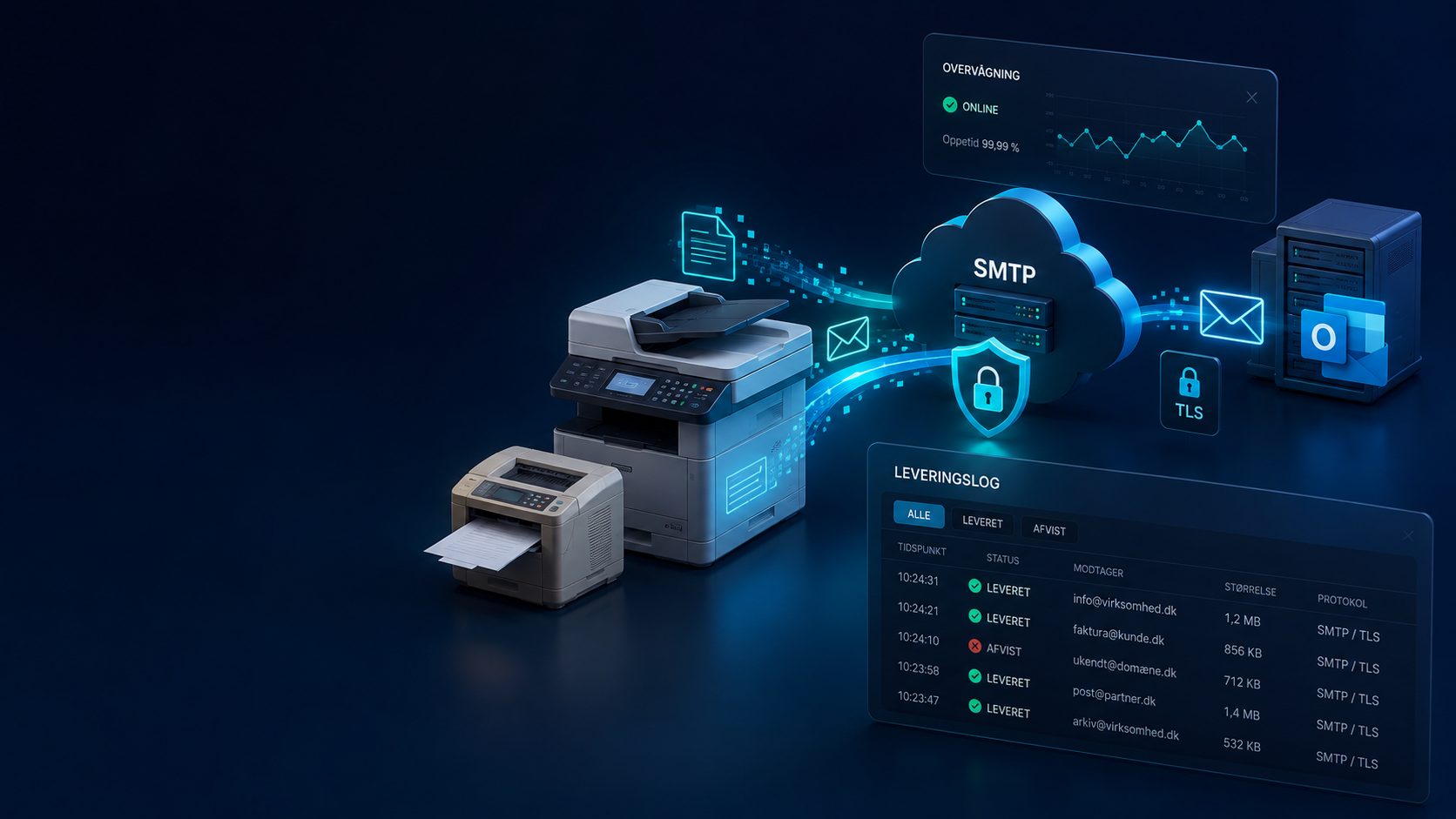
A dedicated SMTP service for printers and multifunction devices. The machine sends to us, and we deliver onwards — even when it is ten years old and knows nothing about modern authentication. No hardware replacement, no changes to your own mail system.
400+ customers · Support in DK, UK and US · Børsen Gazelle 2026 · AAA · D-mærket
Companies that have chosen BitTech








From DKK 25/mo per machine Plus DKK 250 setup per machine. Min. DKK 75/mo. Ex. VAT.
Scan to email, without it breaking every time something is updated.
The printer has been sending for years. Then it stops — and the cause is usually something that happened around it, not inside it. Login requirements tighten, and the machine is rejected without warning. The display says "sent", but the recipient received nothing.
Scantilmail is a dedicated SMTP service for printers and multifunction devices. The machine sends to us, and we deliver onwards — even when it is ten years old and knows nothing about modern authentication.
No hardware replacement. No changes to your own mail system.
What you get
Works with older equipment
Both STARTTLS on port 587 and implicit TLS on 465, which many older machines are limited to. You do not need to replace hardware to move forward.
Encrypted at both ends
From the machine to us, and from us to the recipient where the recipient supports it. We can document exactly which encryption was used, scan by scan.
Documented delivery
Recipient, subject, time, file size and the receiving server's own reply. "Did it arrive?" is answered by a lookup rather than a guess.
A separate account per machine
Each printer gets its own login and sender address, and can be tied to your fixed IP address. If one machine goes wrong, the others are unaffected.
Automatic stop on unusual activity
If a machine suddenly sends far more than usual, the account is blocked automatically and we are notified immediately.
Set up by hand, not self-service
Every customer is configured by a technician with deliberately chosen limits. It is slower to get started — and that is precisely why the service stays stable.
How it works
Simple process, professional result
-
1
We talk it through
How many machines, which brands, and what is causing trouble today. We will say so if you do not need us.
-
2
You get an account per machine
Server, port, username and password — four fields entered into the printer's settings. Typically fifteen minutes per machine.
-
3
We test together
The first scan is run through while we watch the delivery log, so you know it works before moving on.
-
4
We keep watch afterwards
If something goes wrong in three months, we can see what happened. That is the whole difference when someone calls.
Product information
- Manufacturer
-
 BitTech IT ApS
- Data storage
- Danmark
- GDPR compliance
- Yes, fully compliant
- Available languages
- Danish, English, French, German
Why choose BitTech
Most companies solve scan-to-email by giving the printer an ordinary mailbox. That works until the provider tightens authentication requirements — and then you are left with a machine that cannot keep up.
Built for machines
Not a mailbox forced to look after a printer, but a service whose requirements were the machines' from the start
Troubleshooting without guesswork
We can see the receiving server's own reply, verbatim — instead of guessing where the mail went
Safer than the workaround
The alternative is often an open relay that sooner or later gets abused. Here login is always required, and the account can be tied to your IP address
Does not affect your other mail
Once a sender address is blocked, ordinary mail suffers too. Here the machines have their own address
We build it ourselves — so we can do more
Most IT firms resell other people's tools. We develop our own:
BitTech Customer Portal →
Your M365 administration in one place — users, licences, security and devices.
CYOD portal →
Employees order their own equipment, tied into your HR and onboarding flow.
PhishGuard →
AI check of suspicious email, right inside Outlook.
DomGuard →
Monitoring and security for your domain and email.
And we are D-mærket certified ourselves — we have been through the whole compliance journey.
We do not put customers in boxes. We tailor the solution — and we built the tools that make it hold together.
„We were faced with choosing between several IT specialists, but chose a collaboration partner who could deliver everything we need, and thereby give us greater flexibility.“
Frequently asked questions
Answers to the most common questions about Scantilmail
Do we need to replace our printer or scanner?
What does it cost?
Do we need to change anything in our own mail system?
Why not just use an ordinary mailbox for the printer?
How do we find out whether a scan arrived?
How quickly can we get started?
Is there a commitment?
Free IT check (worth DKK 2,500)
No long commitment
Move your plan up or down
Reply within 24 hours on weekdays
Onboarding and migration are priced as a fixed project, so you know exactly what it costs — and day-to-day running is cheap and predictable afterwards.
Ready for an IT partner that just works?
Get a free IT check, and we will map your setup and recommend the right solution.

Support Mon–Thu 08:00–16:30 · Fri 08:00–15:30 · on-call line outside opening hours
Request a quote for Scantilmail
Related services
Explore more solutions that can help your business
IT support for businesses
Someone who answers the phone and knows your setup
Day-to-day IT support for small and medium-sized companies. Remote support straight away, a named contact, Danish support and a fixed monthly price.
Microsoft 365
A workplace that works — across office, home and mobile
Transform your workplace with modern cloud-based tools and secure solutions. We help with Microsoft 365, Teams and digital work processes that increase productivity and collaboration.
BitTech Customer Portal
Your Microsoft 365 administration in one place
BitTech Customer Portal gives you full control over users, licenses, security and devices - without having to wait for support.